Associated Vulnerability
Title:WinRAR 安全漏洞 (CVE-2023-38831)Description:RARLAB WinRAR before 6.23 allows attackers to execute arbitrary code when a user attempts to view a benign file within a ZIP archive. The issue occurs because a ZIP archive may include a benign file (such as an ordinary .JPG file) and also a folder that has the same name as the benign file, and the contents of the folder (which may include executable content) are processed during an attempt to access only the benign file. This was exploited in the wild in April through October 2023.
Description
CVE-2023-38831 is a Zero-day WinRAR vulnerability that lets attackers disguise malicious files in archives, tricking users into executing harmful content.
Readme
# CVE-2023-38831-POC
CVE-2023-38831 is a zero-day vulnerability affecting WinRAR versions prior to **6.23**.
The issue is in the processing of ZIP format which could allow attackers to utilize affected archives to distribute malware. Bad actors can disguise malicious files within ZIP archives by giving them names similar to legitimate ones, fooling users into executing harmful content while believing they are opening a safe file. This flaw has been actively exploited since April 2023, particularly targeting financial sectors, posing significant risks to users who open untrusted compressed files. Upgrading to WinRAR 6.23 or later mitigates this vulnerability by improving filename sanitization during extraction.
# Live Example
In the following example, I downloaded all the provided files into a single folder, executed the script via CMD, specified the appropriate file names (including the exploit),
and finally added some random files to the .rar archive to make it look more authentic and better conceal the new .txt exploit.
When the user clicks on the supposed ".txt" file, it will execute the hidden .cmd file located in the same folder with a matching name:
https://github.com/user-attachments/assets/fc6d9640-127e-4748-99d6-4ebd6efb39b4
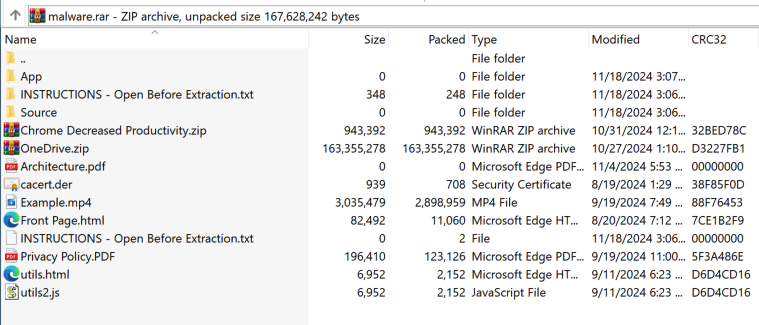
Using this idea, we can attempt to disguise the file as effectively as possible and make the exploit appear urgent or important to the user. In the following example,
I added several random files to make the .rar archive appear more legitimate. I used a basic .txt file as a decoy and named it "INSTRUCTIONS - Open Before Extraction" to lure the user into clicking it:
# Crafting The Exploit
Utilizing the python script provided, you can create your own RAR file which we'll use to see the logic behind this exploit.
Step 1 - Download the ```exploit.py``` and ```DoS.cmd``` files.
Step 2 - Place them all in a folder and choose a random decoy file, for the purpose of this POC I'll use a simple .jpg file.
Step 3 - Run the script and input the required names
The script works in the following way:
1. Grabs the provided file names and extensions.
2. Creates a temporary folder with the script placed inside a subfolder and the decoy file outside of it — both named similarly,
with the folder name appended with "X" and the decoy file name appended with "Y":
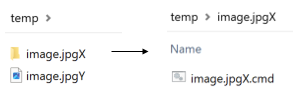
3. It then creates a ZIP file from the temporary folder, opens it in binary mode, and modifies the "X" and "Y" characters,
replacing them with spaces to make it appear as if they are the same file.
4. Writes the modified data into a .rar file.

# Background Logic
Using a program like ProcessMonitor, we can see the exact steps WinRAR takes when executing the file:

The issue arises from ambiguity caused by an archive containing two files with nearly identical names: "image.jpg " (decoy) and
"image.jpg .cmd" (malicious script). The extra space creates a similar base name, which confuses how both WinRAR and Windows resolve file paths. When clicking on "image.jpg ", WinRAR reads and creates all related files in the temp folder due to their similar base names:

To resolve the ambiguity, WinRAR performs a wildcard search (QueryDirectory) for image.jpg .*, aiming to locate an executable file type while ensuring no other related files are present.
WinRAR (and Windows) will always prioritize executable file types (e.g., .cmd, .exe, .bat) when resolving ambiguous paths. As a result, it executed "image.jpg .cmd" using cmd.exe (Create Process), enabling the malicious script to run instead of opening the decoy file in the default image viewer.
# Mitigation
WinRAR resolved this issue in version 6.23, and users are strongly advised to update to the latest version.
https://www.win-rar.com/singlenewsview.html?&L=0&tx_ttnews%5Btt_news%5D=232
File Snapshot
 [4.0K]  /data/pocs/d2606badbaa1e341d6c54d4c3eabaab983677211
├── [ 348]  DoS.cmd
├── [2.0K]  exploit.py
└── [4.2K]  README.md

0 directories, 3 files
Remarks
1. It is advised to access via the original source first.
2. Local POC snapshots are reserved for subscribers — if the original source is unavailable, the local mirror is part of the paid plan.
3. Mirroring, verifying, and maintaining this POC archive takes ongoing effort, so local snapshots are a paid feature. Your subscription keeps the archive online — thank you for the support. View subscription plans →